ARTICLE
Analyzing your agent sessions with Tessl
Optimize your skills with audit log evaluations. Discover friction points and improve performance using Tessl's powerful logging tools. Start now!

Shawn Miller
With Tessl, evaluations serve a very specific purpose: Using an agent, and provided context, see how well a set of tasks can be done with and without that context. Or an evaluation might be used for comparing models. This is great during the development phase of a skill, but during actual usage, a lot of things can occur, things you might not have anticipated or worse, maybe something you expected to happen did not.
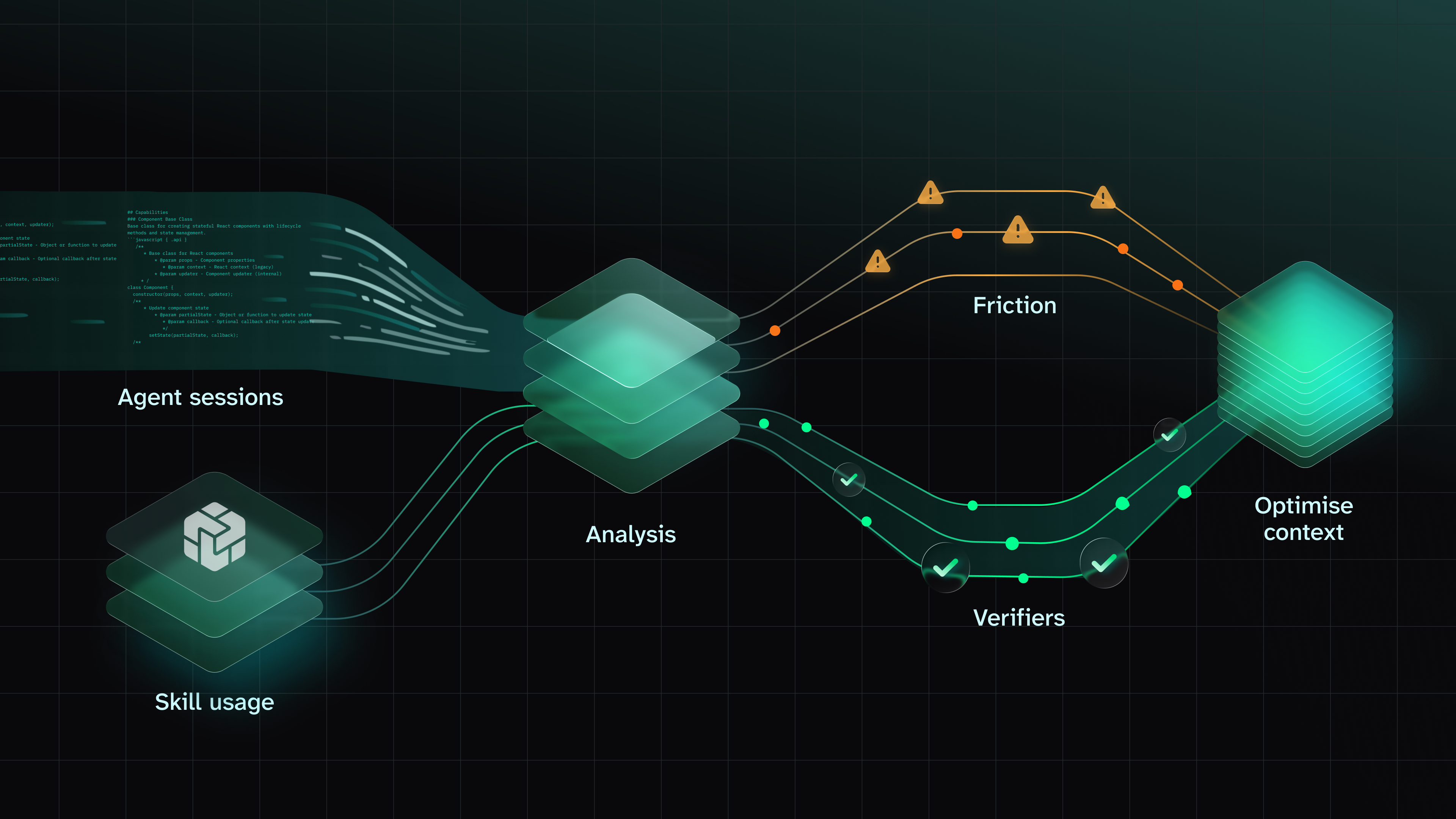
Agent sessions are a tremendous source of information, helping to understand what happened in a session, were certain expected events not occurring. Tessl will examine:
- Friction points that the agent may have had while performing certain tasks. For example, were there errors or things that it thrashed on? This could be something not even related to the skill. Reviewing friction points may identify other areas that may be a candidate for a new skill.
- Certain events, signals so to speak, in the sessions that Verifiers are expecting to find. For example, did certain actions that you expected actually happen? By definition, verifiers are structured pass/fail checklists that track any aspect of agent behavior you care about.
With Tessl, and the try-tessl/agent-quality plugin’s skills, it will create verifiers that come from:- Skills, Docs and rules
- User input, where the user describes what they care about, you turn it into verifiers.
Each verifier captures one instruction with a checklist of binary checks that an LLM judge evaluates against session transcripts.
Session analysis can help you optimize your skill by examining what happened during real world usage in your agents!
Prerequisites
- You have Tessl installed, and configured for your agent.
- Claude Code must be installed. Note that while this feature can be used with sessions from Cursor, Claude Code, Codex and Gemini, Tessl requires Claude Code to be installed on the user’s machine (and logged in) to run the judging.
About try-tessl/agent-quality
The Tessl plugin try-tessl/agent-quality is made up of three skills, which performs the following actions:
- Identifies sessions across any agent you've used in a project. Security being important to Tessl, Tessl redacts credentials from the transcripts and also treats all content as untrusted data.
- Identifies friction points.
- Examines the skill and identifies what things it should look for in session (aka Verifiers).
- The verifiers you are creating are being added to the tile, so a couple scenarios can occur:
- The tile you are creating verifiers for is source-controlled in the repository you are in: verifiers are added as part of the tile
- The tile you are creating verifiers for is checked out from the registry in .tessl: a new tile is created just for the verifiers and verifiers are added to it. This is because new content added to a checked out tile will be overridden.
try-tessl/agent-quality in action!
For the following example, a private skill, called mycompany/tessl-docs-creator was used to review a set of documentation. This skill is used to review documentation and ensure certain standards are maintained. Our goal in using try-tessl/agent-quality is to understand if the skill was used properly and where friction occurred during that normal usage.
As we walk through try-tessl/agent-quality, it’s important to point out that it follows this flow: phase 1, get feedback, phase 2, get feedback and so on. There is a human in the loop and the human can make changes to the skill and verifiers with each step.
Step 1 - Install plugin
In a project that has Tessl initialized, ask your agent:
I need you to install try-tessl/agent-quality
Step 2 - Start the process
Ask your agent to review your agent session sessions with:
Analyze my sessions
If you already have verifiers for your skills, skip straight to Step 5.
Step 3 - Create verifiers
The session will be identified, and ask if you want to create verifiers.
Remember, verifiers are created from Skills, Docs, Rules, and user input, generating checklists that the LLM will judge against. While Tessl automates it, similar to how Tessl generates scenarios in evaluations, it’s recommended you review what’s generated to determine the intent of the skill vs what verifiers are being created.
If you've not already done so, indicate you wish to proceed with generating the verifiers.
If there are no verifiers, ask your agent:
Create the verifiers
You might get asked if you want to create verifiers and/or review friction. In this step, focus on creating verifiers so that you can review them, you will create both in Step 5, which focuses on generating results.
Step 4 - Review verifiers
Your agent will create the verifiers, a summary will be created. Review them to determine if they match the intended purpose of the skill.
Note that if you use verifiers on your skill, Tessl will create a new tile that you can edit if it's not in a workspace you have permissions for.
A verifiers folder will be created with related files.
Once the generation is complete, a set of verifiers are generated for review;
Step 5 - Review agent session
Generate the analysis by asking your agent:
Review the agent sessions
You may be asked if you want to run verifier and friction review, Tessl would recommend running both.
Step 6 - Results review
Once analyis is complete, a summary will be presented.
Review and accept, or modify, any guidance that is provided.
Step 7 - Loop
So now you’ve seen how to create verifiers, and run an analysis, but over time it’s natural to improve your skill, or want to update your verifiers as you observe things while troubleshooting issues. The following guidance will help determine what you should update or which steps to skip to above, when you make these changes:
a) You implement the guidance in step 6: Start an agent session, using your skill, demonstrating normal use over a few sessions, or, over a day or two. After enough data is collected, rerun the analysis to see if it has impact. No verifier modification is required because the guidance that was generated was based on the verifier(s), so you won’t need to update them.
b) You did an analysis, and identified verifiers are not performing as expected: It could be that your verifiers are too wide, resulting in too many things being flagged, or too narrow, where they are not flagging issues you're aware of. In such cases, return to step 4 to modify the verifiers and then rerun the proceeding steps.
c) During your normal workflow you update your skill; Return to step 4 to update your verifiers so they match the new expectations of your skill.
Summary
Ultimately, this is trying to get you data on how your agent is actually doing vs just vibes so that you can iteratively improve it! And when your skill is working well, you’ll have the data to confirm it!
Reviewing agent sessions are a very powerful capability to review what happened in a session, identify friction points and verify if what you expected to occur actually occurred when using the skill. Tessl is building out a powerful toolkit that allows you to evaluate your skill from its packaging, against scenarios, comparing your skill against different models and now providing data on what actually happened during use of a skill.
COPY & SHARE
Shawn Miller
Technology enthusiast.
READING
·
0%
COPY & SHARE
Shawn Miller
Technology enthusiast.
YOUR NEXT READ
Tessl Admin Guide: Organizations, Workspaces, and Roles
Learn how to manage Tessl organizations, workspaces, and roles, including user invitations, policy settings, and workspace creation for efficient team collaboration.
Shawn Miller